

When it comes to online advertising, videos allow you to show off your product, company, or experience in different way that static images aren’t able to show. Facebook’s video creation kit allows you to add movement to your static images when videos aren’t available to you or you want to test out something new.
If you aren’t sure what the video creation kit is, here’s an overview from Facebook themselves:
“With the Video Creation Kit, you can create mobile-first video ads that use your existing photo assets, text overlays and logos. The Video Creation Kit offers templates that you can customize in Ads Manager or from a Facebook Page, and then use in your ads that run on Facebook or Instagram. Each template aligns to a different goal, whether you’re promoting a new product or telling a brand story.”
If this seems like it might be worth a test for you, here are the basic steps in creating your first text to video ad:
Start with the video creation kit, within the Facebook ad creator navigate to where you would normally upload a video, select “Use Templates.”
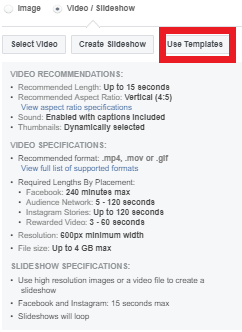
Once you have selected “Use Templates,” you’ll be brought to the following screen:
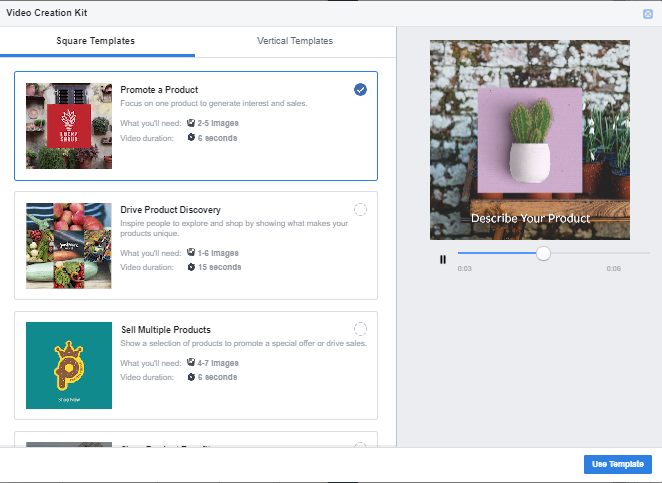
There are different templates that are optimized to specific goals in your campaign & they are as follows:
- Promote a product (6 seconds): Focus on a key product to generate interest and sales.
- Sell multiple products (6 seconds): Show a selection of products, promote a special offer and drive sales.
- Show product benefits (15 seconds): Highlight product features, use case studies or explain how a product works.
- Drive product discovery (15 seconds): Bring your brand to life and share what makes your product unique.
I choose which template I want to use based on the amount of creatives I have available and the goal of the campaign. Some templates only require one or two images whiles other templates require more.
The different templates allow you to get creative and choose which fits best for your brand. You can choose from either a square template or vertical template. You are also able to decide which template is best for you based on how many images you have available for the offer you are running.
Simply follow the template and add in your images, URL, and text and you are good to run your test.
Have you tried the video creation kit before & seen any success? Let us know in the comments below!