

Best SEO Chrome Extensions:
In the world of SEO, it’s no secret that we rely heavily on tools to garner data and insights to influence our actions and recommendations. Tools like Google Analytics, Search Console, SEMrush and Ahrefs are great for deep diving, but not every query or issue requires such robust analysis. Sometimes you just need to simple, quick answers, and that’s where browser extensions can be incredibly useful.
With that said, this post is going to break down some of our favorite Google Chrome extensions that we utilize at Rocket Clicks. Not to discount other search engines and browsers, but with Google holding down the lion’s share of search queries in the US, it’s a good place to start.
Tag Assistant
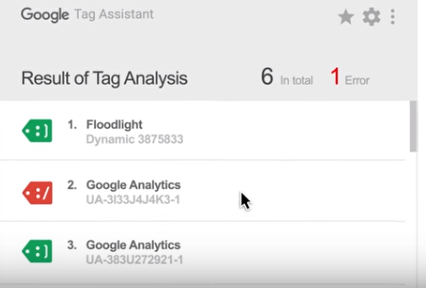
Google’s Tag Assistant extension is an easy, no-frills way to confirm your Google-related tags are in working order and firing correctly. We typically use it for Google Analytics, Google Tag Manager and AdWords conversion tracking, albeit there are others.
Quick checks for tag verification isn’t the only trick Tag Assistant has up its sleeve, however. It also features the ability to record sessions, which allows for analysis of tracking the various tags through the user experience on the site.
Special mention: For even more in-depth analysis (and other nerdy data collection), you can supplement Tag Assistant with the Google Analytics Debugger extension, which stores a hefty amount of session data in Chrome’s JavaScript console.
Link Redirect Trace
As part of the Link Research Tools family, the Link Redirect Trace extension is an efficient way to track a site’s redirects. This is by far the most convenient way we’ve found to check redirects as it gives you the entire redirect chain in an easily digestible format.
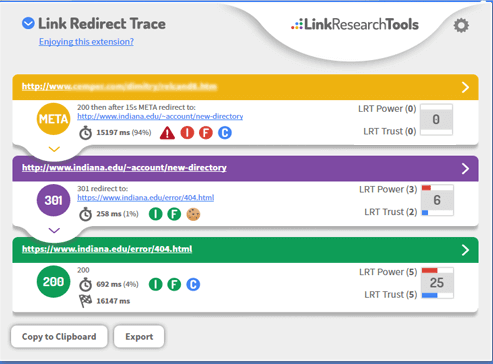
It’s really worth the download for the redirects alone, but the extension also gives header info, quickly checks the meta-robots and delivers link follow/nofollow data and cookie implementation info.
SeeRobots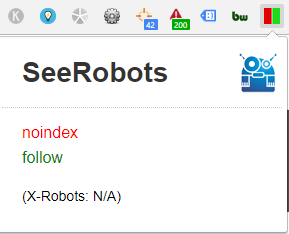
The SeeRobots extension doesn’t beat around the bush. It shows you the meta robots directives for the page you’re on so you can tell whether the page is index/follow, noindex/follow, index/nofollow or noindex/nofollow. It’s great for quickly troubleshooting indexation issues – it’s even color coded so you don’t even have to click on it to get your answers.
BuiltWith
I would venture to guess that BuiltWith (and it’s Chrome extension) is a tool that developers typically use, but SEOs should find this beneficial as well. Especially useful when prospecting and researching potential clients, you can quickly find out how a site was put together. This extension can identify a large number of widgets, analytics platforms, CMSs, frameworks, hosting providers and more. It’s great to start understanding what you’re getting yourself into, so you can properly decide what route you will take with implementation.
Web Developer
Before diving into why the Web Developer extension is a valuable SEO tool, let’s address the elephant in the room: Yes, the Web Developer extension was the victim of a high profile phishing scheme in early August.

It was a wild morning where ads were being injected into browsers and malicious JavaScript was a major concern. That said, creator Chris Pederick was immediately transparent about what was happening and let users know how to keep safe. A mere two hours later, there was an updated plugin and all has been well since.
Back to business: As the name states, this extension was largely made with web developers in mind. That said, it’s functionality is useful in the SEO world. Troubleshooting means a lot of testing, and this extension includes a toolbar that allows you to disable JavaScript, popups, plugins and other features. It also allows you disable, display and edit CSS. These two are the most used aspects of the extension for our purposes, but it also boasts features relating to cookie, forms, images, outline, resize, tools and other options.
Keywords Everywhere
Keyword research remains a big part of SEO. It influences our decisions across the board for both clients and competitors.
The Keywords Everywhere extension pulls data from Google’s Keyword Planner, Google Search Console, and other sources to give an estimate of the search volume around a keyword. When turned on, any search on Google will deliver an approximate keyword volume and CPC estimation, per month.

It’s not perfect, and we do not recommend basing in-depth keyword research on these numbers alone, but it’s a great place to start. You will want to be aware that this extension, when on, will automatically add CPC information into Google Analytics and Search Console. If you’re not aware, this might be confusing, but a quick flip of the switch and everything is back to normal.
Grammarly
Rich content provides context for Google on what the page is about. Its importance can’t be understated, but the more content you produce, the chances of making embarrassing mistakes in grammar will undoubtedly rise. Grammarly is an extension that combs through your content and alerts you to any issues – so you can think of it as your personal copy editing extension.
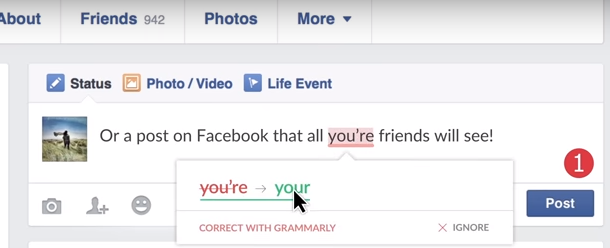
Special Mention: It is worth noting that there have been reports that using Grammarly with WordPress can lead to some strange conflicts. If you regularly work with WordPress, we recommend exercising caution when using this extension with that platform.
Beyond these, there is an endless list of other Chrome extensions that could be useful and just as many are probably being created right now.
This list is what we at Rocket Clicks like to use, but if you have any other suggestions, please leave them in the comments below.
Efficiency, accuracy and results are what we strive for, and these extensions are just one of the many pieces we use to achieve it.